
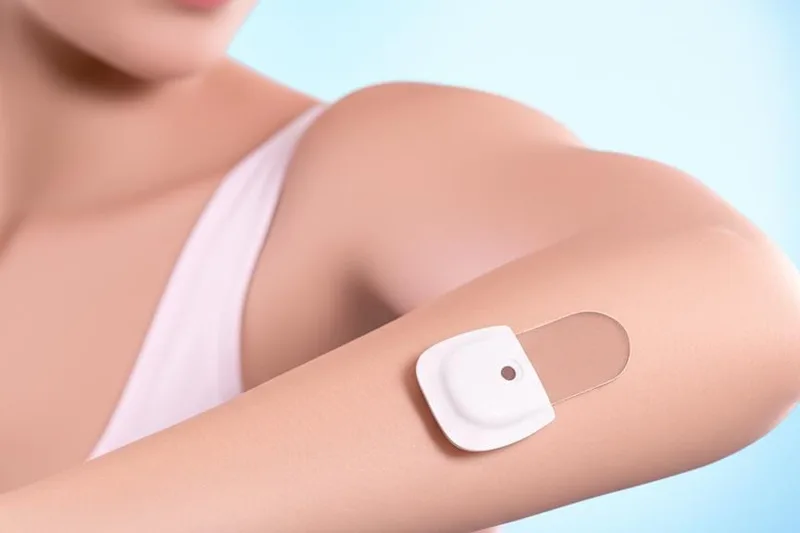
If you're living with diabetes, you're probably used to pricking your finger several times a day to check your blood sugar levels. But has your doctor told you about a new, slightly different method? It's a device called a CGM, or Continuous Glucose Monitor. This helps you keep track of your blood sugar levels.
What is the difference between a glucose meter and a CGM?
Both of these devices measure blood sugar, but there are big differences between the two. Think of it this way: the average blood glucose meter you use is like a police car speeding at a single point. That is, it only shows the amount of sugar in your blood at the exact moment you take a blood sample from your finger.
But a CGM (Continuous Glucose Monitor) is much different. It's like a GPS that tracks your speed throughout your entire journey. This device automatically measures and records your blood sugar levels every few minutes throughout the day, day and night. Looking at this data, you can get a clear picture of how your diet, exercise, and daily habits are affecting your blood sugar levels. Using this information, you and your doctor can work together to better manage your diabetes.
Many people think that CGM is easier to use because it doesn't require constant finger pricking. But it takes some time and patience to get used to this new system. Let's see how to get used to it easily.
How does this CGM work?
This involves placing a very small sensor under your skin. It doesn't measure sugar directly from your blood. It measures sugar levels from the fluid between the cells (interstitial glucose) under our skin.
This sensor is connected to a transmitter, which is attached to the skin with something like a patch. This transmitter sends your blood sugar level data to an app on your smartphone, an insulin pump, or a small device called a reader that comes with it. You can then upload this data to a computer, see trends in your blood sugar levels over time, and share it with your doctor.
Some CGM systems also allow you to track your food intake, exercise, and medications, which can help you better understand the relationship between your lifestyle and your blood sugar levels.
Many CGMs even have an alarm to alert you if your blood sugar levels are dangerously high or low. Your doctor will explain how to use this device to you.
Things to keep in mind when switching to a CGM
There are a few things you should be aware of as you get used to this new technology.
The sensor needs to be replaced.
Depending on the type of CGM you use, you will need to replace this sensor yourself every 3 to 14 days . This is designed to be very easy to do. This sensor is usually placed on the abdomen, thigh, back of the upper arm, or upper buttocks.
Sometimes, the sugar level readings can vary slightly depending on where you place the sensor. So, if there is a big difference from the readings you see with your finger, try placing the sensor in a different place. Avoid placing the sensor in places that are often pressed when you sleep or where it gets caught by clothing.
There is a slight lag time.
This is very important. When you take blood from your finger, it shows your blood sugar level at that moment. But because CGM measures the sugar level in the fluid under the skin, that value is about 5 to 10 minutes behind the actual value in the blood. That means CGM shows what your sugar level was 5 minutes ago.
This is not a big problem in most cases, but it is important to keep this delay in mind in situations where your blood sugar levels can change quickly, such as after taking a dose of insulin or during exercise.
You still need your old glucose meter!
Don't throw away your old glucose meter just because you're using a CGM. Sometimes you need to "calibrate" your CGM twice a day, which means checking the readings, and you need your old meter. That means checking whether the fingerstick reading and the CGM reading are the same.
In the following cases, you should definitely take a fingerstick and recheck your blood sugar level.
| Opportunity | What to do |
|---|---|
| When a new sensor is installed | Most CGMs require a finger prick to calibrate the sensor within the first 2 hours after insertion. |
| If the CGM value is abnormally low or high | If you are unsure about the value shown by the CGM, test it with your finger to confirm. |
| When you feel symptoms of low/high sugar | If you experience symptoms of low blood sugar such as feeling faint, sweating, or shakiness, or symptoms of high blood sugar such as excessive thirst, regardless of the CGM reading, check your fingerstick to confirm. |
| When you think your CGM reading is inaccurate | Any time you feel like your CGM reading is wrong, check it with your finger. |
Don't panic when you see the values on the CGM!
When you start using a CGM, you may notice that your blood sugar levels are higher than before. This is because you were only checking your blood sugar at certain times of the day with your old meter. But a CGM will show you the spikes in your blood sugar levels, especially after meals.
Don't panic when you see your blood sugar going up and down like this. Don't suddenly take a higher dose of insulin or suddenly eat more carbohydrates thinking that your blood sugar will go down.
Instead, discuss this data with your doctor. Your doctor is the best person to look at this complete picture from the CGM and decide what changes are needed in your diabetes treatment plan.
Very important: Do not make changes to your treatment, especially insulin dosage, based solely on CGM readings without your doctor's advice. There are only a few types of CGMs approved by the FDA for use in making treatment decisions. Ask your doctor if your device is one of these types.
Take-Home Message
- While a regular glucose meter shows your sugar level at that moment, a CGM monitors your sugar level throughout the day and gives you a complete picture.
- The CGM reading may lag the actual blood sugar level by about 5-10 minutes.
- Even if you use a CGM, keep your old fingerstick glucose meter nearby to verify and calibrate the readings.
- Don't panic if you see previously unseen spikes in blood sugar levels with your CGM, but talk to your doctor about it.
- Avoid changing your treatment plan (e.g., insulin dose) based solely on CGM values without medical advice.




💬 Comments (0)
No comments yet. Be the first to share your thoughts here.
Add Your Comment